Solved on paper, not yet in practice
Most of my work begins with informal conversations and group sessions about how work actually gets done. More often than not, by the time I'm sitting across from someone, they've already solved their problem, not in practice but on paper. They've chosen a tool they believe will fix what's frustrating them, and they've come ready to make the case for it.
The thinking behind the pick is often sound for their role and the slice of work they're closest to. What's harder to see from inside the position is whether the problem they've diagnosed is the one actually costing the organization, and whether the fix works for everyone else it would affect.
Teams assume other teams work the way they do
One of the most consistent patterns I see is that teams in the same organization assume other teams work roughly the way they do, with the same rhythms, handoffs, and expectations about how information moves. It's a reasonable assumption. You share a building, systems, and leadership, so why would your processes be fundamentally different?
In my experience, they are.
One version of this that stayed with me was a project with the City of Burlington that began as a CRM upgrade. Across interviews with 8 departments and teams, people arrived with a solution that worked for their part of the organization:
- A different CRM platform for one group
- A work management platform for another
- SharePoint for a third
Each answer made sense from where that group sat.
What no single answer showed was how differently they worked. The manager responsible for customer service described a belief inside the organization that the team only handled requests for services already set up in the CRM. That team was the city's main phone line and inbox for residents, and handled whatever came in.
That's the gap a business case written from inside one team can't show. A tool that fixes one group's problem can create a new one for another, and a process that feels broken in one department sometimes works fine for the next.
4 questions tell you whether it's a tool problem
You don't need a workshop to find out whether you're in this position. Most of it comes out of 4 questions, answered honestly and not only by the team that picked the tool.
1. Is the frustration about communication expectations, or about the lack of a platform?
These look identical on the surface. You can usually tell by asking what happened the last time something fell through the cracks. If people describe a missed handoff, an unclear owner, or a decision nobody knew had been made, the fix is an agreement about who tells whom, by when, and in which channel. The tool is only a container for that agreement. Buying the container without making the agreement gives you the same confusion in a new interface, plus a migration. On the city project, one director described emailing colleagues internally and getting no response. No CRM changes whether someone answers an email.
2. Would this change how one team works, or how several teams work together?
One team can change how it works on its own, and reverse it cheaply if it doesn't land. Once several teams are involved, both get harder. The moment a decision crosses a boundary, the people on the other side belong in the conversation before the purchase, not during rollout. Rollout is where a decision is communicated. It's a poor place to learn that the decision was wrong.
3. Is there something already in place that could be adjusted rather than replaced?
I often hear from teams carrying so many overlapping tools that keeping up with the tools has become the friction. Check whether the current system was ever set up for the way the work is done now, or whether it was configured for a structure that has since changed. A tool that was never fitted to the work is a different problem from a tool that can't do the job, and only one of them is solved by buying a different tool.
4. Does the team have the skills to get value from this?
A capability gap and a tool gap look identical until you look closely. A good check is whether anyone can describe, specifically, what good use of a new tool would look like 6 months in. If the answer stays at the level of features, the gap is probably capability, and new software tends to make that more visible rather than smaller. On the city project, CRM training showed up in the organization-wide findings, not only in one department's.
Here's what I'd do first with each answer:
| If the answer is | Do this first |
|---|---|
| A missed handoff or an unclear owner | Agree who tells whom, by when, and in which channel. A new tool won't make that agreement for you. |
| Several teams | Trace one piece of work with those teams. |
| The current tool was set up for an older structure | Reconfigure it and see if the friction goes away. |
| Nobody can describe good use 6 months in | Plan the training before the purchase. |
| Every answer points back to the tool | Buy it, with the affected teams already in the conversation. |
Tracing one piece of work shows the steps nobody counted
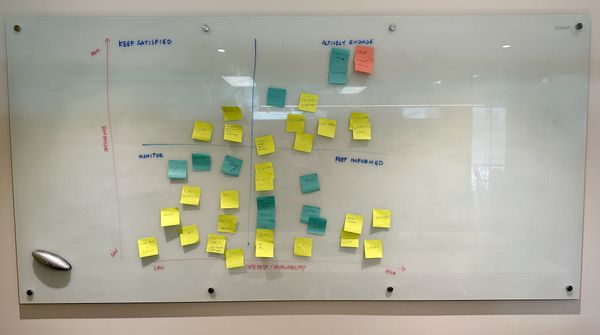
When a decision crosses teams, I bring people from each affected team into the same room and trace one piece of work that already ran, start to finish. This is close to stakeholder mapping, with one difference that matters. Stakeholder mapping sorts people by influence and interest, which tells you who to keep informed. Tracing a piece of work across those same people tells you where it gets stuck.
You can run a version of this yourself:
- Pick something recent and ordinary: a request that arrived, a change that got approved, or a customer issue that started in one place and ended in another.
- Invite the people who handled it, not only their managers.
- Give each team a horizontal track on a wall or shared board.
- Have everyone plot:
- What they received
- What they did with it
- Who they handed it to
- What they waited on
- Where they went when it stalled
2 things tend to happen:
- The map turns out longer than anyone expected, and the extra steps are almost always informal, like a spreadsheet one person keeps because the system doesn't hold that field, or an approval that officially takes a day and in practice waits a week for a meeting.
- Someone says a version of "I had no idea you handled it that way," usually within the first hour.
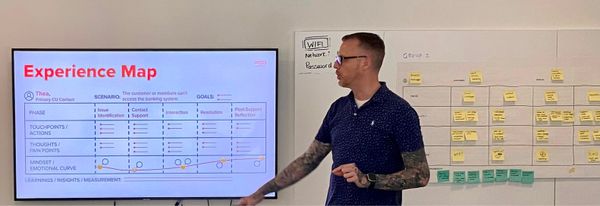
That sentence is where the useful work starts. For each informal step, ask what would break if it disappeared tomorrow, and who would notice.
- If something breaks, it's a constraint, and any new tool has to carry it.
- If nobody would notice, it may be a habit that outlasted a reorganization, and it's worth questioning whatever you buy.
By the end, the room shares one view of the problem, drawn by the people who live inside it.
Moving fast is right until a decision crosses teams
The most common pushback I hear is that there isn't time for this. There's a deadline, the team has already done the thinking, and more looking sounds like overhead on a decision that could have been made weeks ago.
That's fair, up to a point. The team closest to a problem often sees it most clearly, and when a change stays inside one team, moving quickly and adjusting as you go is the right call. The calculation changes when a decision crosses teams. Undoing it means:
- Migrating data
- Retraining people
- Running 2 systems in parallel while the transition plays out
In my experience, that can take longer than the early conversations would have.
There's also a cost I rarely see in the business case. Someone put their name on that tool. They made the case for it and asked their team to change how they work. Reversing it later means revisiting that decision in public, in front of the same people. The early version of this can be a few conversations, held while the decision is still open.
Sometimes the tool was right
That early work sometimes confirms the choice. The problem is what the team said it was, and the tool they picked is the one to buy.
Of course the consultant recommends more discovery. The objection is reasonable, so it's worth explaining why that work isn't wasted.
A confirmed decision lands differently than an assumed one:
- The affected teams have already been part of the conversation, so rollout isn't the first they hear of it.
- Their concerns are known early enough to design around.
- The decision carries a record, which matters the next time someone asks why the organization uses this thing at all.
It's also how the person who chose the tool can test it without walking anything back. The question I'd put to other teams isn't whether the pick was wrong. It's whether the decision holds up for everyone it touches.
On the city project, what I handed over didn't pick a platform. It was a discovery report the CIO could present as evidence, drawn from interviews and workshops across 8 departments and teams, to help inform that decision.
The software is identical either way. What changes is everything around it.
Getting this right costs a willingness to hold the solution loosely until the problem is better understood. That's a low bar, and in practice it's the part that gets skipped.
Where to start when a tool is already on the table
If your organization is weighing a tool right now, here's where I'd start:
-
Write the problem down without naming the tool. If the sentence only works with the product in it, it describes a solution. Rewrite it until someone on another team would recognize the problem as theirs too.
-
Ask the 4 questions beyond the team that picked the tool. On the city project, the most useful finding was about a team other departments thought they already understood.
-
Trace one recent, ordinary piece of work with the people who did it. Use a request that actually ran, not the process as documented.
-
Frame it as testing the decision, not reopening it. Have the person who chose the tool lead the conversation.
-
Write down what was tested and who was in the room. Whichever way it goes, there's an answer when someone later asks why the organization uses this tool.